VMware Migration Quest with Microsoft
Part 1: The fastest path to victory
Your leaders are asking you to perform a miracle, but to do it you’ll have to embark on an ambitious quest. We know, you’re stuck between a rock and a hard place. The relationship is changing, and costs are rising. You’re trying to find a path forward for your existing environment.
So, what are your options with Microsoft? Luckily, you have a bunch of different ways to skin this particular dragon. The first step in any direction is to assess the terrain. Where are you now and what tools do you have at your disposal without spending any gold? Free loot will always beat merchant bought when it comes to solutions. This goes for software, hardware, human resources, and swords. Take stock of what you’re running, where, and how long you need to operate it.
Failing to Plan… (Leeroy….Jenkins!)
You can’t find a solution without first understanding what the goal should be. You need a plan your journey. The first part of a good plan is to understand your organizational goals, needs and requirements. What does victory look like when you get to the end? Start with that and work backwards. The solutions and technologies selected will be support characters (NPCs) in your party along your VMware Migration Quest. And you can’t start a quest without some good music!
Is there stuff you’ve been putting off? You know, things that you just never got around to taking care of? A bunch of tools and materials you never cleared out weighing you down? I find when I need to do one big thing, it’s always better to find a way to do three or more smaller ones at the same time. The payoff is bigger, and the value is greater. So, look around your organization for all those extra things and put them on the board. Work in as many as you can to sweeten the pot. Don’t let them turn into long boring sidequests though.
- Do you need to decommission systems?
- Co-location or DR contracts that you need to evaluate?
- Is there planned spending for a hardware refresh you can reallocate?
Rationalizing the organization’s needs and determining what can, should, or shouldn’t be moved is a great first step. Once you have a handle on that, start looking at the hard/soft dates you need to transition. Can you run without support for your perpetual licenses or purchase 3rd Party support as a bridge? This will build out the roadmap and you can layer resourcing on top.
Also, this can’t be understated, the best migration/transition is the one you don’t have to make. So, what’s the number? What is the company willing to accept to keep the status quo? It can’t just be a few % less than the current renewal, or maybe it can. Take some time and have the discussion internally to understand if you’re willing to continue the relationship now that it’s evolving. If you are, great! That’s the right decision for your organization. Trust me, we won’t be upset. We’ll probably NEVER know. It will be very difficult to capture and hold the attention of any technology partner who may feel as though you’re just going through the motions. We do see these situations quite often and we talk to our account teams about customer commitment as a qualifying factor for engagement and investment.
Up to now, I’ve sounded like a therapist (and MMORG player), I KNOW. There’s a good reason for it. A lot of customers we talk to are reacting to a vendor relationship going sour. We see them go through the stages of grief in real-time. Microsoft needs to know what that Acceptance stage looks like for your company and so do you. Once that is known, we can have a VERY productive conversation about the options available.
We often recommend starting discussions with business owners and technical stakeholders in a workshop, Innovation Hub or EBC session, to understand the objectives, requirements, and help educate us on your estate. Sometimes there’s resistance to this because it requires time from us and you. In other words, commitment! It can be difficult to make time investments if you’re unsure of the path. If this level of engagement is too much for any reason, it can be informative on its own. You can save a bunch of time by cutting that check to Broadcom and going about your day.
If you do choose to spend that time with us, thank you! We’ll start by understanding your needs, goals and business outcomes. This will usually involve an assessment and connecting a few systems, like your vCenter instance, into a tool we call Azure Migrate. Then we’ll start looking at the data along with an RVTools export to understand the current state for planning the migration. There are a few different primary paths the conversation can go down and one or more solutions may be the right answer for your specific needs and goals.
Choosing a path for the journey
Microsoft has made significant investments in our public cloud platform, Azure, to deliver the best-in-class experience for our customers. We’ve delivered identity, management, monitoring, security, and automation for operating and moving your workload quickly and efficiently into the cloud. These investments help to deliver tangible business and operational advantages for our customers compared to continuing to run their environment on their own. They include using an orchestrator and API driven platform called Azure Resource Manager to collect various services and deploy them through a template based system.
The declarative nature of the platform allows customers to move quickly, working in minutes and hours what used to take weeks and months. Time is money as they say. You can also respond in a more dynamic way with the service capacity in Azure. Instead of planning for peak usage, you can plan for temporary additional capacity. Allowing you to right size the workload for the business instead of planning for the worst. This is why rationalization that I mentioned previously is so important. If not done, you end up running the same as before with a bigger bill. Azure also frees up valuable time for your resources to focus on business needs instead of physical plant MAC activities. Azure is an Always on Programmable Infrastructure with millions of combinations.
There’s also a bunch of great ways to get started with Azure leveraging the power of our Azure Landing Zones and Cloud Adoption Frameworks to get started and scale. Now, let’s look at some of the solution options available for this VMware Migration Quest.
Price: ****
Speed to Deploy: ****
Speed to Migrate: ****
Pros: Fastest Solution Deployment and Migration Path
Cons: No workload modernization and limited hardware configurations
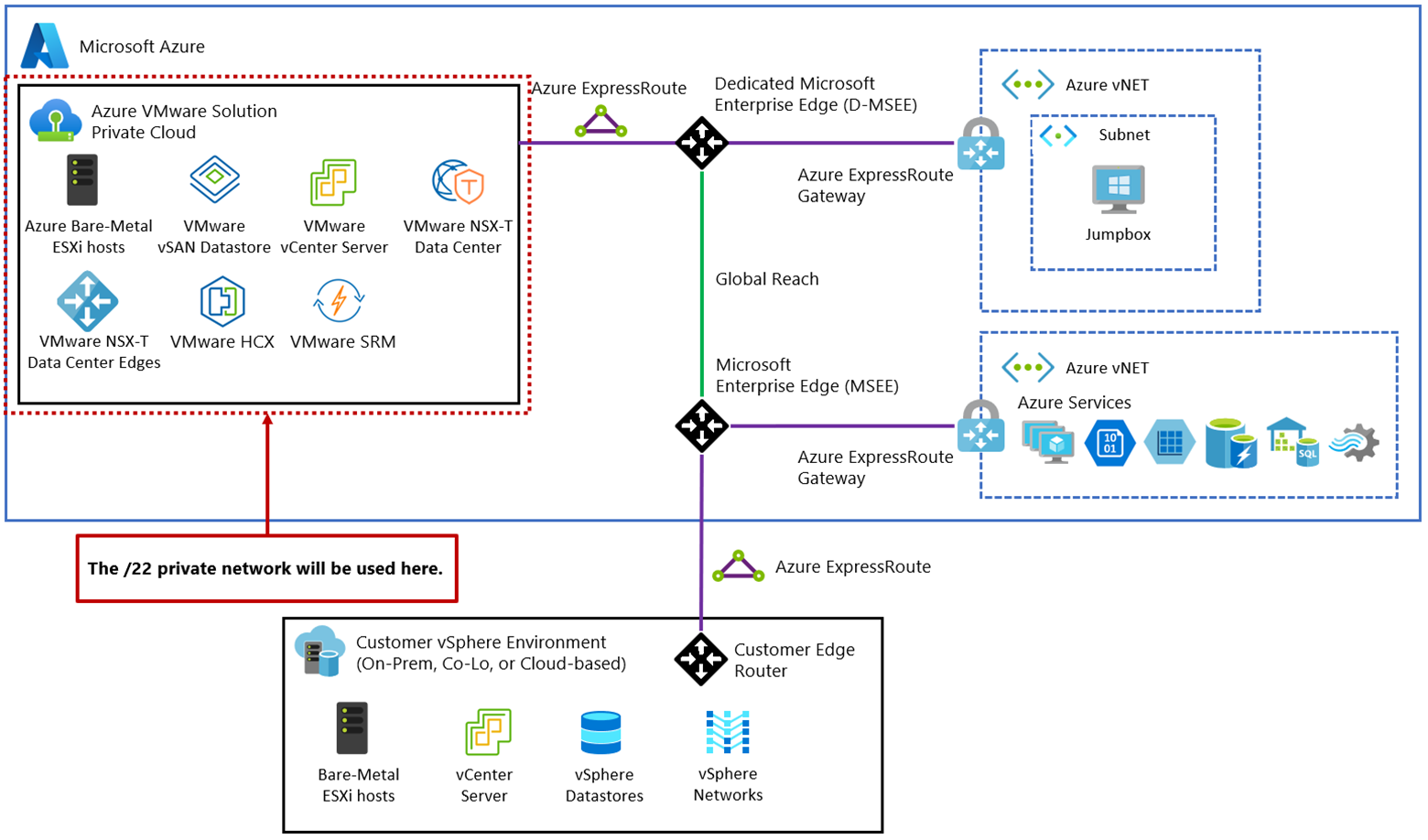
The first option on our journey is the fastest path to value. An as-is move into Azure with Azure VMware Solution. It’s like taking a portal to a part of the game you’ve already played and knowing all the best places to level up and get to loot. It’s a straightforward and efficient way to migrate your existing environment without much of a lift. It requires a few steps in the portal to deploy the infrastructure, usually within a few hours. It will spin up a VMware vSphere environment with the required number of ESXi nodes, vSAN, vCenter, and NSX-T. From there, you get to use all the tools you know and love from VMware to replicate the VMs into your new AVS cluster(s).
Your account team will likely engage an SME in the service to help you understand the sizing options, vSphere services available, and provide a consumption estimate from the Azure Pricing Calculator to help you get an idea of the service cost. The more detail you provide, the better we can estimate so please engage in as much detail as possible. No one likes going into a conversation expecting X price and then being surprised with Y price as the conversation evolves and things get added.
Your account team and the Azure Specialist will go over things like the recommended over-subscription rate for the solution, reserved instances, and rationalization all to help you maximize the usage and minimize the cost.
We have many customers who choose to go down this path. Especially if they can move their entire VMware environment. It’s business as usual with Azure as your datacenter. There is a lot of value that can been driven once those workloads are in Azure with our other Azure services like AI, Security, and PaaS offerings. We see a lot of customers start to move components into other Azure services once they are running on AVS to further optimize. It’s a smoother transition if all the data is in the same place on the same network.
Going Native
Price: ****
Speed to Deploy: ****
Speed to Migrate: ***
Pros: Limitless hardware options and granular cost controls
Cons: No workload modernization and slower migration time
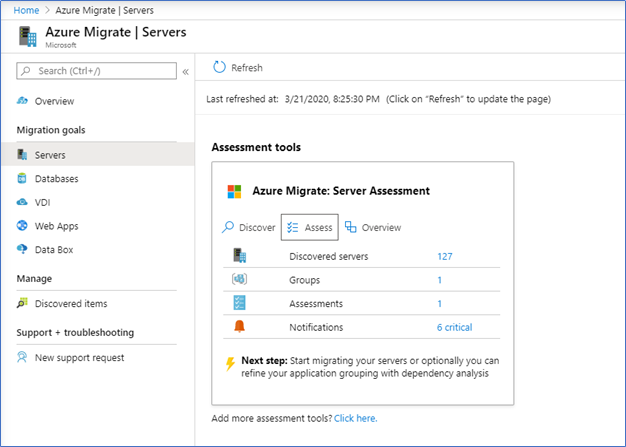
The next path is a direct migration to Azure IaaS infrastructure. You can start on this path now in the Azure portal through our free Azure Migrate service. Simply click the Icon and start your first project. You’ll need to deploy the data collector, then it will ingest a lot of information from your vSphere environment. Once the data collection is up and running you can build detailed assessments to determine the cost, size, and tools to make a move into Azure IaaS VMs.
We see a few customers choose the IaaS path if they have specific requirements which aren’t met within AVS. Maybe you need ARM VMs, a bunch of Blob storage, direct access to GPUs, or Scale Sets. You may want to take advantage of best-in-class solutions like Azure Kubernetes Service moving off Tanzu. Things like those would fall outside of standard AVS deployments. Those workloads can still be moved into Azure; you’ll just migrate them into Azure directly vs running within vSphere. That’s the power and flexibility with using Azure vs running on-prem. All of this comes on a single monthly bill.
Price: ***
Speed to Deploy: ****
Speed to Migrate: **
Pros: Low overhead for workload deployment and lowest cost
Cons: Resource intensive to refactor applications and less flexible than IaaS
If you’re willing to do some additional leg work and shed the hypervisor layer completely. Customers can further optimize their environments by looking at any number of our PaaS services. Azure Migrate will make recommendations and provide you with options for some of these also. You can use Azure SQL MI, Azure App Services, Azure Fabric, AI or IoT solutions. These are for those workloads which are well understood and documented within your organization. Not everything can go down this path for a variety of reasons, but we do see customers skip the IaaS steps and go straight to PaaS services for the right workloads. The big contributor to success here is availability, timing, data and skills. Refactoring an application isn’t for the faint of heart even in the best of times… and these aren’t those times.
It’s all about the timing…
If you need to get off your existing VMware licensing in say less than 6 months, then AVS is really the best bet. We’ve seen some VERY motivated customers move even faster. If you have more time, at least 6-12 months to pilot, plan and test. Then you might consider a set of IaaS or even PaaS services to run some of your applications. There isn’t one right answer here and it depends on your specific environment and requirements. You can take a mixed approach as time allows. Moving the big rocks, purchasing a fixed amount with additional capacity bolted on that will sunset is also an option if time allows.
These are the short paths to victory. Azure is a set of ready-made solutions to help you along the way. You know the old saying, “You can have it Fast, Cheap, or Easy. Pick two.” That very much applies here as well for the different solution options. Azure has some very cool cost-saving features for our customers. We offer discounts for Azure commitments, Reserved Instances, Savings Plans, Azure Hybrid Benefits, pricing and estimating tools with our Azure Pricing Calculator, Azure Migrate and built-in cost analysis tooling within your subscriptions to help control your spending. Reach out to your Microsoft Account Team to learn more.
I hope this first part of the series has helped you understand the quickest way to get to the end goal of your VMware Migration Quest. There’s a lot in here and a lot of ground covered. We do know that cloud won’t always be an option for everyone or every workload. In the next part, we’ll discuss our Adaptive Cloud options that exist outside of Azure and how Microsoft can help there too. There are several ways you can win the day and emerge victoriously. You might just have to pick your battles along the way!
Thanks for reading!