VMware Migration Quest with Microsoft
Part 2: Charting a new way
In Part 1 of this series, we discussed many of the motivators, needs, and planning for a VMware migration to Microsoft solutions. We also covered the quickest paths to accomplishing that type of migration into Azure for time sensitive needs. However, as we know not every workload can move to Azure. Some for governance and compliance reasons and some for technical reasons. But you’ve been asked to find ways to optimize your environment and reduce your spend. There are a bunch of ways Microsoft can help you there in Azure. And a few we can help you with outside of Azure while maintaining the advantages of cloud management.
This post, and the one after it, will be a bit different than the first. In the first post, the options are straightforward, and the patterns well established. It’s an easier read because cloud solutions have a simpler adoption curve. Microsoft Adaptive Cloud solutions are straightforward but also nuanced and, like all on-prem solutions, have more moving parts leading to added complexity. I’ll do my best to give you the design intent, theory of operation and implementation for the options, but ultimately only you can decide what works, or doesn’t, within your organization.
After taking our quick wins with the fastest path to migration with Azure, we now set off on a different leg of our migration quest, an on-premises transformation. On this path, we’ll pick up a few new party members and train some new skills while honing some older ones. The terrain is different, if familiar, and there are some steep climbs. If Azure VMware Solutions (AVS) and Azure IaaS are like Fast Travel to the best parts of the game, On-prem transformations are like grinding your favorite dungeons to level up!
All roads lead to Arc
The end state is important to understand to have context for the journey. Microsoft believes strongly in a single pane of glass for management. That single pane of glass is the Azure control plane powered by Azure Resource Manager (ARM). Azure native services benefit from the monitoring, reporting, automation, identity and security of the Azure Portal and API experience. Resources outside of Azure weren’t really able to take advantage of these management tools in a holistic way before the advent of Azure Arc.
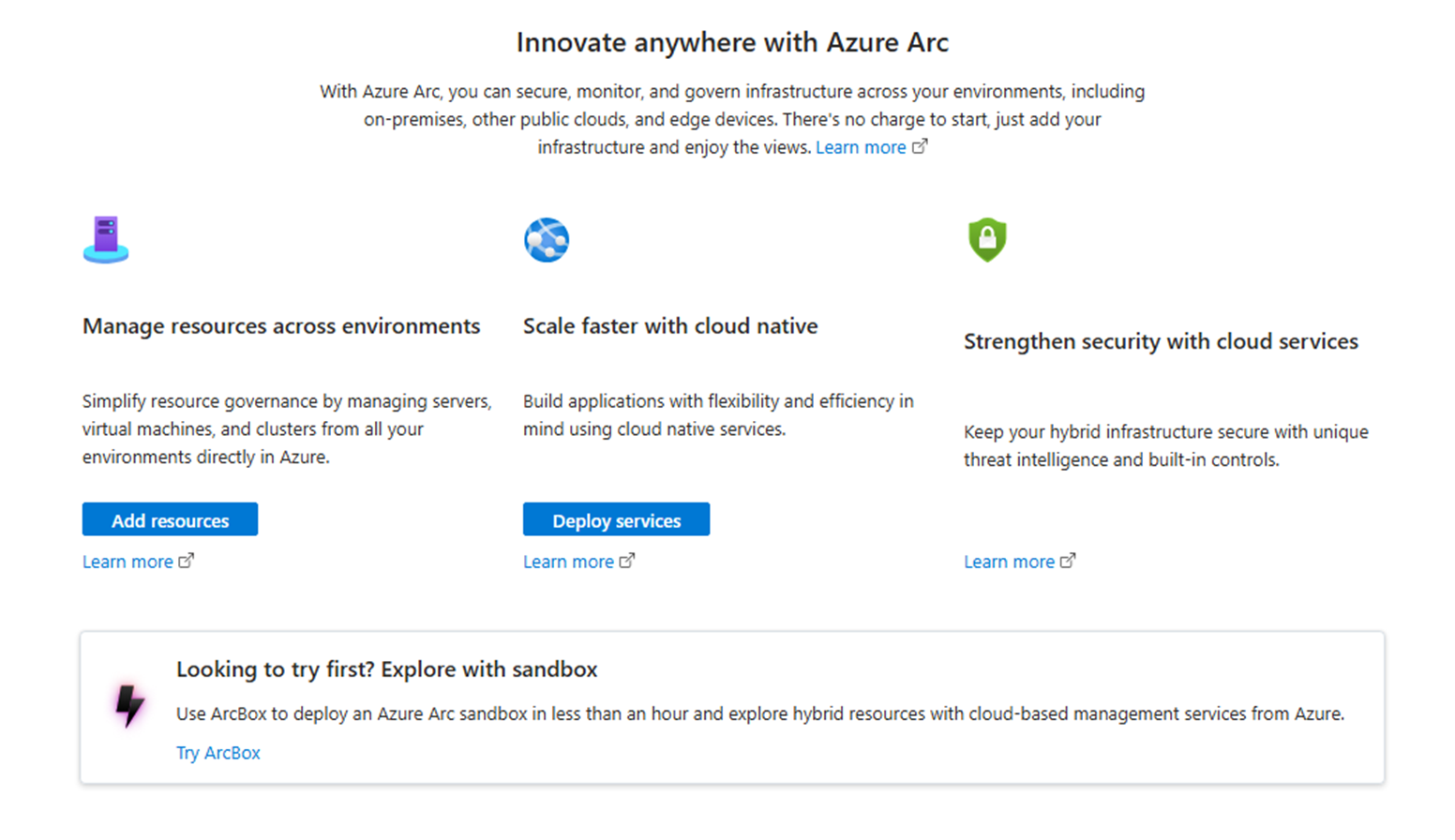
Azure Arc Landing Page
Azure Arc in its simplest form is a projection service. It allows “things” that exist outside of Azure to be seen within Azure. That one VERY simple concept is really powerful when you consider all the class leading management capabilities and services available within Azure. It allows the same organization benefits of Resource Groups, Tagging, Azure Graph and Search customers enjoy with Azure VMs, IaaS, PaaS services to work on things that aren’t “IN” Azure. It also provides the same security benefits with EntraID and Identity Access Management (IAM) integration. Those are just the start though. You’ll pick up a ton of additional benefits as you start to use other Azure services. Things like Azure Monitor, Defender for Cloud, Azure Update Management, Key Vault, IoT Services, and the list goes on.
Azure Arc works with on-prem platforms like Azure Local, VMware, SCVMM and Kubernetes clusters. It provides visibility at the OS level too not just with Windows, but also all the popular flavors of Linux. This isn’t restricted to Virtual Machines either, physical servers are supported as well. It also helps to future proof your existing on-prem and legacy workloads by connecting them to cloud management services and concepts. This is all done through outbound connectivity over encrypted connections. It can also communicate over proxy, ExpressRoute, VPN and Private Endpoints.
Arc started as a single agent-based connection and has grown into an entire portfolio of services customers can consume to manage their large sprawling estates. vSphere and SCVMM have a single VM Kubernetes cluster called an Arc Resource Bridge(ARB) which feeds environment information into Azure. We have customers with thousands of systems being managed by Azure Arc today either centrally in a datacenter or in a distributed edge environments. All of this being done for some of their most business critical workloads.
So, what does this have to do with on-prem VMware migration with Microsoft? It’s a fair question. The answer is everything. Microsoft’s on-prem solutions use Azure Arc integration as a bridge to Azure. If you want to transform your environment over to Microsoft solutions, the north-star for us is Azure. How are all of these things managed? The answer is Azure. Even the latest and greatest versions of Windows Server and SCVMM offer direct access to Azure Arc out of the box. Microsoft also helps our customers take advantage of many Azure services through the Arc portfolio completely free if you have an active Software Assurance agreement.
Let’s look at the first option for your on-prem workload’s that can’t go to cloud.
Price: ***
Speed to Deploy: **
Speed to Migrate: **
Pros: On-Prem Azure managed OEM hardware for legacy and modern apps
Cons:
- Net new hardware required
- Not a datacenter virtualization replacement
- Deployment and VMware workload transformation can be lengthy
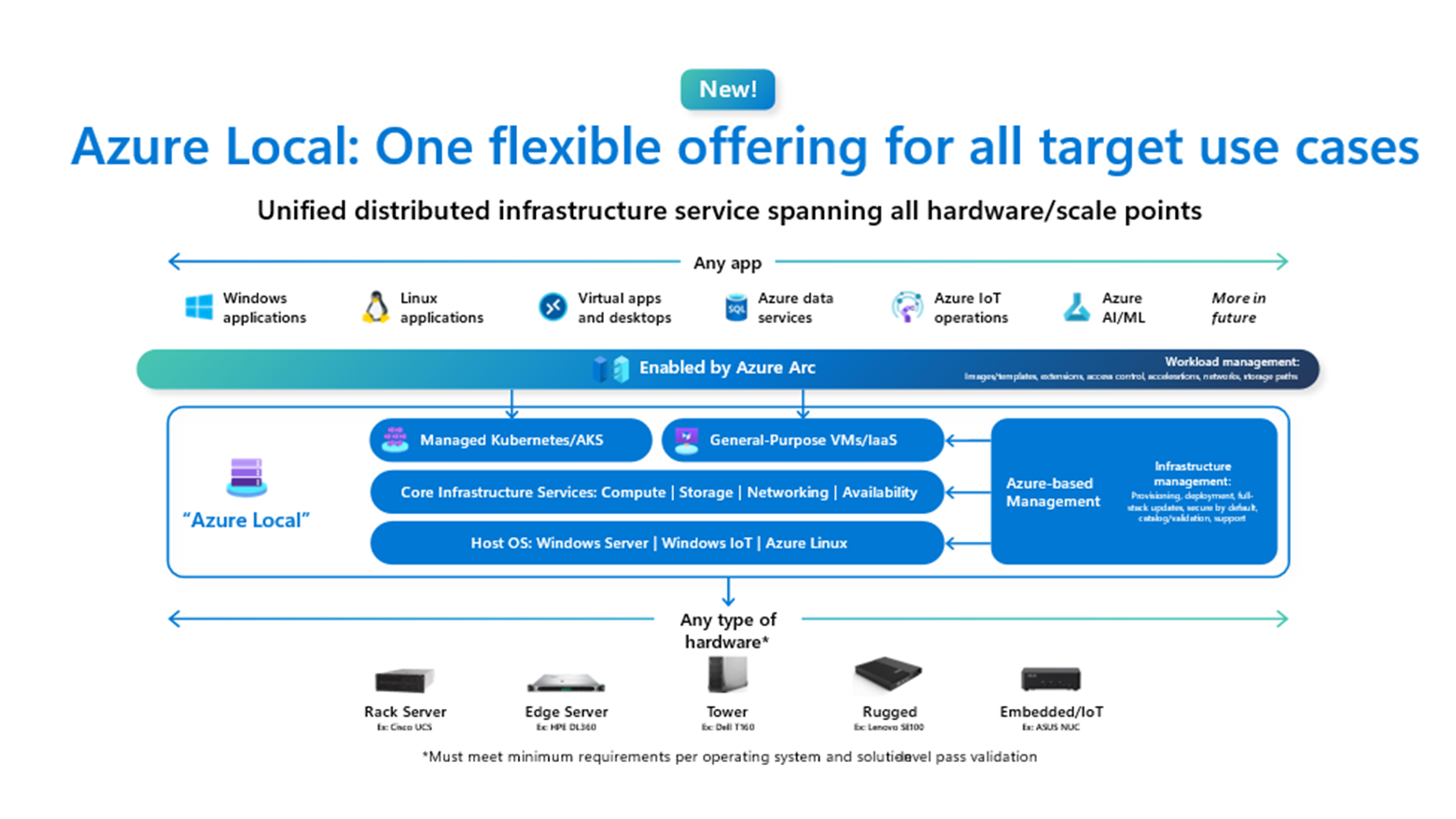
Given the directional nature of the solution information provided, and attempting to write for brevity, this won’t be an all-inclusive review of Azure Local or its capabilities. There is plenty of that content already available. Nor should it be treated as a substitute for official Microsoft documentation. Writers are fallible and solution options and capabilities can change over time. Please refer to the official Azure information sources linked in this post for detailed and up-to-date information.
Azure Local is a newly announced portfolio of on-prem OEM partner hardware solutions that connect directly into the Azure control-plane through Azure Arc. Today, we have a single “Connected Servers” option that was formerly known as Azure Stack HCI. It’s built from the ground up on the Azure Kernel code-base to offer an ever improving set of services and solution offerings. Over time the other two options in the family will become available. The Low-End Hardware option will be single or multiple node options with either an Azure Linux deployment or Azure Local (Windows Kernel) deployment all driven from Azure. The Disconnected option will have a local management service control-plane that allows you to deploy and run Azure Local completely disconnected from Azure public cloud.
Yeah, I know… there’s a lot there. So let’s break down what you can get right now and how. The middle “Connected Servers” options is currently the only one Generally Available (GA), meaning you can purchase, deploy, and get support for the product. You’ll contact your preferred OEM, after looking at your options in the Azure Local Catalog, who you’ll work with to size an environment. They’ll offer one or more different types of solutions. Azure Local comes in today:
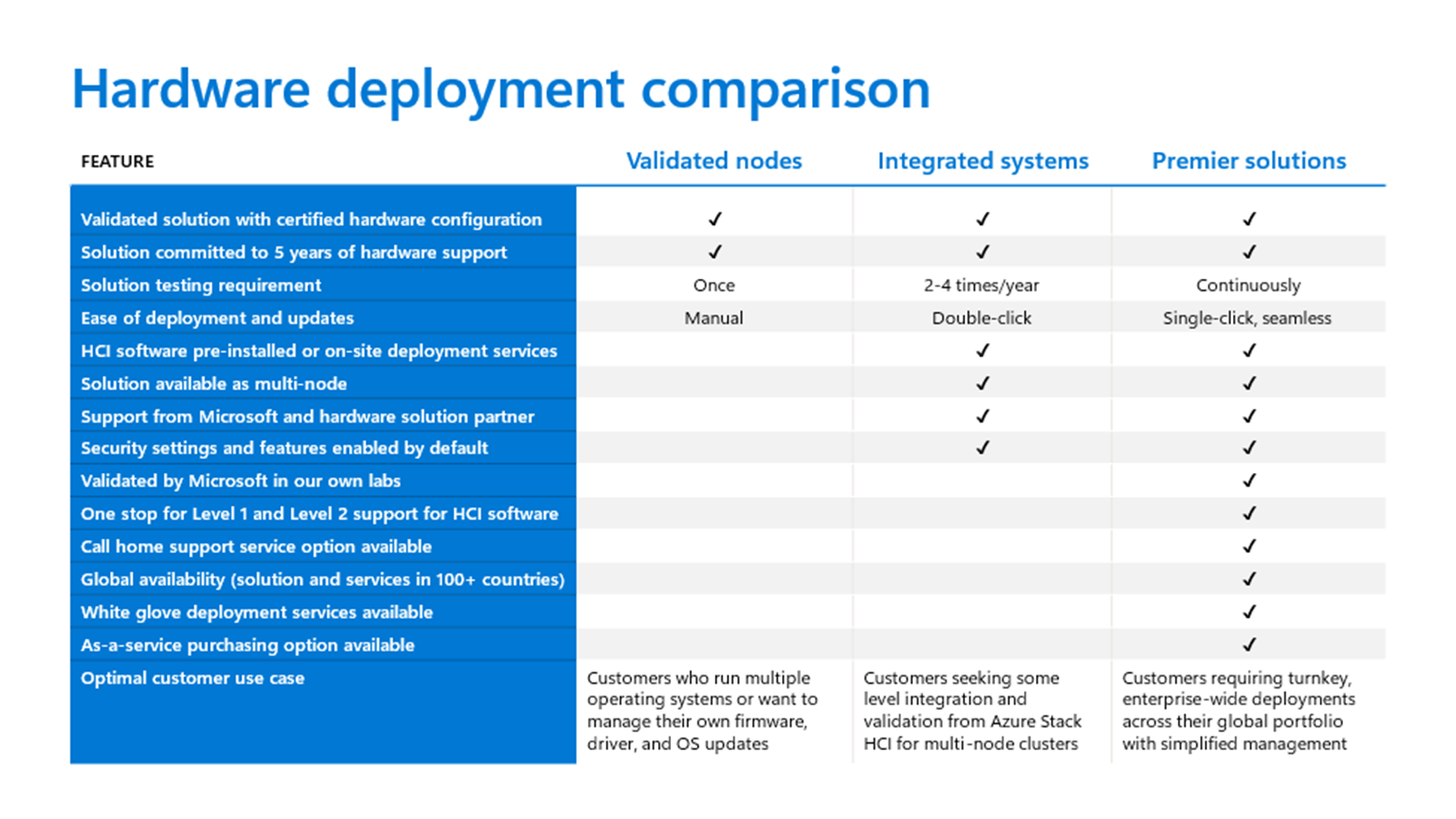
- Validated Nodes
- Integrated Systems
- Premier Solutions
Validated nodes are the roll your own option for customers. The OEM has tested the hardware nodes and developed a driver package to work with Azure Local, making it available for customers to use. It’s supported by them. If you have an issue you’ll need them to troubleshoot it. The Integrated Systems are a step up and offer solution level support from Microsoft and the OEM with testing multiple times per year. There are also optional support and delivery services uplifts the OEMs will usually provide. The Premier Solutions are co-engineered with Microsoft and offer a bunch of coordinated service offerings, OPEX purchase options, and advanced capabilities. Pricing and budgets will increase, around 10-20% per tier list price, as you move to the right. Please check with your OEMs for detailed pricing information.
Going Rouge
It’s important to point out that Azure Local does not have any ability leverage existing or reuse existing hardware. Its greenfield only. Our OEMs have worked very hard to offer solutions aligned with the latest and greatest hardware capabilities available with Azure for CPUs, GPUs, and Disk performance of the VMs and other services you deploy across Azure Local and Azure public cloud. Mismatched capabilities often leads to a poor customer experience (and performance), which no one wants.
Sure, you CAN cobble something together if you have a vendor’s bill of materials for Azure Local, access to their firmware/drivers and pull down the image from the Azure portal, but it WILL bite you in a few ways. First, very few OEMs use or make available for customers their general CTO/BTO server SKUs for Azure Local. Most OEMs preload the OS onto the systems, level set the firmware for you, and configure optional firmware settings for an Azure Local deployment. In doing so, they typically publish different SKUs compared to the normal stuff you buy from them or get through a distributor. Even if it’s based off the same hardware platform. This causes a supportability mis-match when you put an Azure Local image on a normal server. The second issue is the config. Azure Local is a Hyperconverged solution which means specific NICs, storage controllers and discs in a very specific configuration chosen by the manufacturer were tested, validated, and approved by Microsoft. Trying to back into those selections is a hard road. Thirdly, the support matrix for Azure Local and Windows Server IS different making finding the compatible parts, firmware, and drivers much more difficult. CAN you do it? Sure. Will it be supported? Please check with your OEM before you start, but most likely No. So… that effort could be good for lab testing and kicking the tires, bad for production. That said, you can learn SO much from that Awful, Horrible, No Good, Very Bad path. Trust me.
GEEK warning! (Things are about to get VERY technical)
Origin Story
The Azure Local Hypervisor is an Azure Windows kernel branch specifically designed to deliver hyperconverged services for Compute, Storage and Networking. This is a Hyper-V based solution as almost all Azure solutions are. It uses mostly similar Failover Clustering, Storage Spaces Direct, and optionally Microsoft’s SDN stack found in Windows Server 2025. This is all derived from the original Microsoft WSSD reference architecture published for Windows Server 2016. That was the foundation for the very first Azure Stack products too. There have been a BUNCH of changes/enhancements/rationalizations since that initial architecture release.
Why is it important that this comes from an Azure branch vs say the Windows Server branch of the kernel if they use the same technologies?
There are a few reasons:
- Azure dev cycles allow for more rapid enhancements than every couple of years for boxed products
- We can decouple the OS build version from the feature capabilities and iterate
- Azure support is provided with Azure solutions directly in the portal
Microsoft’s first pass at an Azure managed solution was called Azure Stack, later renamed Azure Stack Hub. It spawned a family of offerings culminating in Azure Stack HCI. Azure Local is an improved version of that product family. What we found with Azure Stack was customers needed greater velocity from us to enhance product capabilities. Faster even than every six months or a year. As a result, Microsoft has since moved away from the Windows Server and Client OS release cadence of Azure Stack HCI such as 21H2, 22H2, 23H2, etc. being the major releases. Those are still included from a Core OS perspective, but the solution enhancements are now done on Azure release train cadences of every few months. Similar to how the original Azure Stack (Hub) product is developed. You can go here to learn more about the changes: Azure Local, version 23H2 release information – Azure Local | Microsoft Learn
Back to the Future
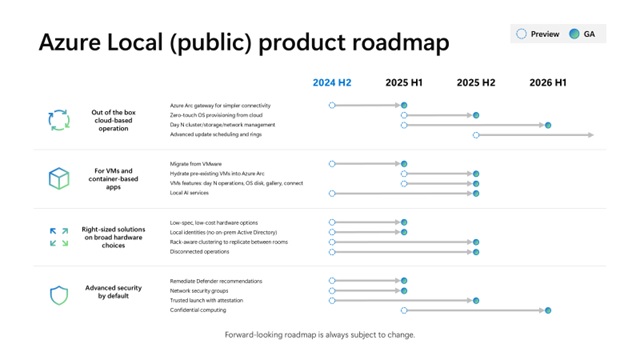
The platform is being enhanced much more rapidly on this new release cadence. In fact, upgrading from an Azure Stack HCI releases like 22H2 to the current build moves you directly into the new Azure Local release train with all those new features. Also 23H2 and the Azure Local name change should be treated like a new version of the product by adopting this methodology. As a result, these enhancements will need to be adopted by your organization as the product evolves. This is a VERY different requirement than version changes to vSphere products. If that makes you uncomfortable, we completely understand. Adopting features at a fast clip can be jarring and require different testing and roll out plans. It’s worth the time to discuss this internally and decide if adopting change at the speed of Azure is right for your business. Here are some of the big things you’ll get in just over a years’ time if so:
Deployment
Azure Local is cloud deployed and managed from the start. Where Azure Stack HCI was connected to Azure as one of the final deployment steps. It’s not possible to run this product without connecting to Azure. The Azure Local deployment process is a set of ARM templates or an Azure portal based wizard experience that will build, validate, and deploy the infrastructure remotely. There’s a clear separation of the hardware deployment actions and the solution deployment actions. This allows greater flexibility and separation of roles for our customers.
All of the nodes will need to have an identical configuration. They will need to be installed, cabled, and powered on. Someone will connect to them and register with Azure Arc. Please don’t deviate from the documented deployment process. Installing Non-OEM 3rd party software on the hosts is not supported. In fact, outside of installing drivers and firmware or configuring a hostname, IP, DNS (proxy if required) and Azure Arc registration. Do nothing else locally. After the nodes show in Azure, you go straight into the deployment wizard to form the cluster. There’s a lot of flexibility in how you configure the networking topology and storage configuration. Many customers chose to replicate their vSphere node connectivity. Just know that the storage network should be redundant and it doesn’t need to have unique IPs or a gateway per cluster, but the broadcast (L2) space should be for one cluster only. Make sure not to get your wires crossed in the process! There are also built-in defaults available for security and storage to help first time users deploy in a secure and scalable solution.
Day 2 Operations
Management of the cluster and workloads can all be done within the Azure portal under the Arc landing page. We have a bunch of tools outside of just the deployment workflows though. We’ve integrated cluster management with Windows Admin Center (WAC) directly in the portal. We’ve connected Azure Update Manager with a cluster specific view which will perform a coordinated update process across the nodes to keep workloads running. We’ve worked with our OEMs to integrate their updates into those update workflows as well. You can also deploy VMs the same way you do within Azure (Portal, API, CLI and Automation) using Azure images to your own locations. You can manage those VMs directly within the portal as if they are Azure VMs (because they are, they run on an Azure platform). What isn’t able to be done today is cluster management operations via command line or programmatically within Azure Resource Manager (ARM). Those can be done interactively within the WAC, but if you want to automate something related to the cluster you’ll need to drop back to PowerShell or a PowerShell integrated automation tool, at least for the time being. This is being worked on, but it’s not available today. WAC within the Azure portal isn’t the only management option available. You can also deploy WAC locally for management should it be required. This can be helpful if your environment become disconnected from Azure. It’s the same web based experience just running locally. Don’t worry, all your running workloads will continue to operate without the cloud control plane. Azure Local can run disconnected from Azure for up to 30 days. SCVMM is also an option for our System Center customers to managed Azure Local. It offers scalable cluster management across a large number of Azure Local clusters.
Do’s and Don’ts
Another thing to note, Azure Local isn’t a product primarily targeted for datacenter virtualization or high concentration compute. The published maximum cluster size is 16 nodes. The practical limit, which is determined by our OEMs, is really around 6-8 nodes per cluster. The majority though are being deployed as 2-3 node clusters for point compute needs in edge locations or for appliance like workloads. Why 6-8 instead 16? It’s a matter of physics and money.
Almost all of these Azure Local clusters purchased today are deployed with NVME storage. The solution being a hyperconverged design where all the disks are managed by the CPUs in a pool across the cluster storage network fabric. NVME transmits data at PCIE speed replicating across a cluster disks in real-time. It makes the solution very performant, but with each node added, the network traffic increases exponentially. Throw in VM migration traffic between the nodes and network requirements can easily approach or exceed the limits of 100Gb ethernet with higher node counts. It can get expensive quickly. Microsoft has designed a lower cost option though, 2-4 Nodes can be directly connected without switches. This saves you money and network complexity. Azure Local also doesn’t support any SAN attached, SAS, or MPIO storage or perform any type of integrated SAN fabric management by default.
Another factor is management, the solution being Azure managed means there’s a management controller deployed automatically when the cluster is created. This controller is the same type used for SCVMM and vSphere, the Arc Resource Bridge. Today, there’s a 1:1 mapping for the ARB and Azure Local cluster resource. This creates a single island of management per cluster. It can be really good for remote or distributed sites, a little unwieldy within the datacenter.
As an example, consider a datacenter with 8-10 racks in a single row. You can fit two clusters in each rack or spread them across racks for redundancy. That would be up to 20 different Azure management endpoints per row! There are practical management limits at play here. This is the primary reason why we also support SCVMM as a management option for Azure Local.
So, if you don’t put Azure Local in a datacenter, where do you put it? The most common customer demand we see is for deployments outside of the datacenter. These would be small to medium size businesses, distribution centers, field offices, retail, manufacturing, and medical facilities are all good candidates. You CAN deploy in a datacenter, however it’s not intended to replace any existing datacenter virtualization layer. The most common use for datacenter deployments are Kubernetes clusters, VDI/DaaS workloads, IoT workloads, AI workloads and applications that need to live next to other system types that can’t leave the datacenter like Mainframes, Midframes and the like. In other words, contained use cases where you need a specific compute profile.
If you’ve made it this far congrats! I usually lose some players a few paragraphs back. If you decide that you want to try out Azure Local, what does that look like? The most direct path is to go here: Azure Arc Jumpstart: Azure Local HCIBox. This will give you the general look and feel that you can deploy today. You can also review the relevant documentation, release notes, and enhancements. Once you’ve kicked the tires a bit, reach out to your reseller, OEM rep, or Microsoft Partner to get started on the path.
Depending on the selections you make, installation services may be optional or included for your deployment. I highly recommend you take advantage of them. Implementation of a cloud controlled infrastructure is a VERY different thing than a VMware vSphere environment. There is a lot of planning required. Depending on your organization it could take a while to get the needed approvals for a purchase and working through the Azure endpoint requirements, setting up proxy exceptions, or Private Endpoint DNS configuration. There are also services in preview for Azure like the Azure Arc Gateway which can help, but those require configuration and planning also.
Just say no
A note on a VMware head-to-head evaluations. When we get requests for these, I actively avoid them. As do many others I know. Azure Local is a different animal than VMware Cloud Foundation (VCF) or standard vSphere. Sure, they both host VMs and Containers, can be had as an HCI configuration, and they are both offered through OEMs as a packaged solution. Walk like a Duck, talk like a Duck and all. That’s really where the similarities end though. This is all a matter of the perspective and history of each offering. VMware has spent decades perfecting the on-prem virtualization space. Differentiating themselves with a bunch of solution capabilities unique to them. There are tons of features it will have which Azure Local simply won’t. Microsoft has spent decades perfecting our cloud virtualization platform (Azure) and offering bundled virtualization capabilities with Windows Server Hyper-V. There’s tons of stuff we can do that VMware can’t. And, I know what you’re thinking, “Great, just give the list for each or product comparison matrix.” Unfortunately, there isn’t one. At least not one published by Microsoft. These products aren’t direct competitors. It really is an Apples and Oranges comparison.
I always encourage our customers to focus on business and hard technical requirements.
- What do you need it to do?
- How do you need it to perform?
- Does it meet your resiliency needs?
- Do the solutions meet those requirements?
- What’s the CAPEX or OPEX cost to implement the solution?
- How is it to manage?
- How much of your environment is in the cloud or moving there soon?
We know you love VMware. That’s why it’s a successful product run by almost all of our customers. If your evaluation is for a feature-by-feature VMware replacement, I’ll save you a bunch of time. Azure Local won’t succeed. If you look at Azure Local as a cloud managed on-prem compute platform, it does that really well. It’s your business critical local compute for when everything else is moved to Azure.
The End
Seismic market shifts, like the one we’re in now, are an opportunity to re-evaluate the long-term solution strategy for your business. We think that Azure Local does a great job of helping our customers accelerate their transition to cloud while addressing those portions of the business which can’t be easily moved.
There are a whole set of other topics which come up after a customer decides to move down this path. How can I migrate my workloads, what are the costs involved, how can we move quickly with as little disruption as possible? Or alternatively, you convinced me that Azure Local isn’t quite right for me but how about that Hyper-V thing you guys used to talk about all the time? What does that path look like?
Those topics and a few others will be included in the next part of this series. Thanks so much for reading! I hope you found it valuable.